
This weeks curated #Mentorsfca Learning Nuggets

Posted December 14, 2016 By Frank Strona


This weeks curated Learning Nuggets:

11 Examples of Facebook Ads That Actually Work (And Why) – One way to do just that is to create optimized Facebook Ads targeted at the right audience. Optimized ads can help you spend your PPC budget wisely and see a positive return on your investment. So, what does optimized Facebook advertising actually look like? If you’re looking for some great examples, you’ve come to the right place. In this post, we’ll quickly go over the three overarching formats for Facebook Ads: right column, desktop News Feed, and mobile News Feed. Then, we’ll show you eight different types of Facebook Ads, each with real-life examples — along with some insights into why that ad is so successful. But before we get to these examples, let’s discuss the four components of a good Facebook Ad (or any ad, really) regardless of its type …

Dunkin’ Donuts, Wendy’s and other brands sound off on what works in live streaming  – Live video has emerged as an important tool in the marketer’s arsenal. With streaming video expected to account for 82 percent of all internet traffic by 2020, according to Cisco’s June 2016 Visual Networking Index report, more brands are likely to take the leap. Here’s what they can keep in mind, according to brands that have already tested the waters: [ED NOTE: Must read]

25 ideas to squeeze out more time for content creation – Successful bloggers, YouTubers and podcasters have the same number of hours in a day as you. Everybody has equal opportunity to create content, but not everybody makes it a priority. The real question isn’t having the time, it’s whether you have the tenacity to do it—and keep doing it. I can’t bolster your determination, but I can provide 25 ideas and best practices to help you squeeze more content-producing productivity out of every hour:

Snapchat users cut short video ad views –  Some marketers aren’t pleased with viewability numbers for ads on Snapchat, according to Ad Age. The metric that stands out the most is that video ads on the app are viewed for less than 3 seconds on average. Part of the issue is that video ads run as interstitials in user Snap stories, leading many to simply tap through brand spots rather than engage. Snapchat argues that ads on the app are effective even with a short viewing time, pointing to eye-tracking studies that found ads on its platform get more attention than ads on Instagram, YouTube and Facebook. Two-thirds of Snapchat ads also run with the sound on, unlike video ads on Facebook.

A Website That Gives You Points as It Spies on You – Welcome to the strange, creepy world of clickclickclick.click. (That’s a URL. Go ahead! Click!) When you arrive, you’re asked to turn on the sound. That’s so a quiet man’s voice with a European lilt can encourage and taunt you as you click around. The setting: nothing but a big green button and a scrolling background of text cataloguing your achievements. Big achievements these are not. You’ll get points for clicking the button five times fast, or moving your cursor in a straight line, or making the browser window as big as possible. Poke around for 30 seconds and the site seems silly. Stay a little longer and the absurdity starts to mean something. The site is showcase of the ways, big and small, your browser can be used to spy on you. It turns the browser window into a circus ring, and asks you to perform flips to rack up meaningless points. For the curious and obsessive (me), it’s impossible to click away.


5 Mistakes Employees Make When Challenging the Status Quo – It’s time for companies to embrace their rebel talent as a way to foster innovation, employee engagement, and change from within. But what happens when a brave employee decides to challenge organizational conformity and offer new ideas that she sincerely believes would improve operations, before the company has embraced the idea of rebel talent? She’s often on her own, making it up as she goes along, often tripping over organizational potholes and stepping on cultural landmines.

3 ways to make your videos sizzle instead of fizzle – Most corporate videos are boring and creatively bankrupt. These duds include talking-head videos, tired product demos and pandering customer testimonials. It’s no wonder they evaporate quickly into the online mist. Here are three steps for creating videos worth watching:




One of the e-lists I am on, share these weekly and when I find a few worth sharing I will post them as well.

Now You Can Create Twitter Moments via Mobile Devices – Back in September, Twitter (finally) announced that all users would be able to create their own Moments, Twitter’s narrative-style ‘storytelling by tweet’ device which they introduced just over a year ago. And while Moments has failed to gain the traction that Twitter had hoped it would, opening up the option to all users presented a whole new option, a whole new canvas for people to work with, and there’s been some great examples of brands who’ve used the option to create interesting, compelling new campaigns.

Keys to conquering social media in 2017 – Social media—as many digital marketers know it—refuses to slow down. To keep up with trends, consumer inquiries and engagement efforts, it’s imperative that PR pros and social media managers learn new skills and apply them to their current strategies. To more effectively engage with audiences, automation marketing outfit TapInfluence foresees an increased dependence on the relationship between brand managers and influential social media users. Here’s more, from its 2017 predictions guide: Influencer marketing has emerged as a real line item in the modern marketer’s toolkit. The question is no longer whether or not it works; rather, it’s how to best integrate influencer marketing in a scalable way. What else should social media marketing teams have on their radar for the coming year?

While We Weren’t Looking, Snapchat Revolutionized Social Networks – Snap Inc., the parent company of the popular photo-messaging and storytelling app Snapchat, is having a productive autumn. A couple of weeks ago, Snap filed confidential documents for a coming stock offering that could value the firm at $30 billion, which would make it one of the largest initial public offerings in recent years. Around the same time, it began selling Spectacles, sunglasses that can record video clips, which have become one of the most sought-after gadgets of the season. And yet, even when it’s grabbing headlines, it often seems as if Snap gets little respect.

Confessions of an Instagram Influencer – Because of this—and because advertising budgets will inevitably flow to any medium where large numbers of people are spending large amounts of time—Instagram has attracted a sort of professional class. These “influencers,” as they’re known, are media properties unto themselves, turning good looks and taste into an income stream: Brands pay them to feature their wares. Look a little more closely at your Instagram feed, and you’ll probably notice that attached to the post of the gleaming hotel lobby, the strappy heels, the exquisitely berried breakfast is a sea of hashtags—among them, #ad or #sp, which discreetly disclose that these are in fact sponsored posts. There are thousands, perhaps tens of thousands, of influencers making a living this way. Some make a lot more than a living. The most successful demand $10,000 and up for a single Instagram shot.


Sometimes you do want that mention so you can stand out!

Posted November 28, 2016 By Frank Strona

13901454_10209804189519008_6252853461501085835_n

I recently came across this post on the blog for the web-developers site MoPro.com and thought they did a nice job with simplifying some key steps to getting your site and presence on the web stronger.  For the full article click here. Essentially they key points includes the following with some editorialization by me. It must have been looking at this image I took this summer while typing this that inspired my reflective thinking today about standing out in a crowd.

1. Create a sitemap and submit it.

Google actually has a great link for this here . Since its where you want to integrate too ,Its always good to start with them then expand your search. Several online tools exist for creating sitemaps as well and found this blog post on SEMrush helpful as a starting place read.

2. Submit your URL.

Yes this means you actually submit it to Google. Here are a few places to review on the hows and whys;

Submit URLs to Google

But the actual submission is done here (you will need to login in) URL Submission page.

3. Set up your Google Analytics.

When I was first starting out – I understood this in concept – but found it somewhat confusing until I realized that if you don’t know the place to add the code, it won’t make sense. If you aren’t super tech savvy – this is a place you want to talk to those that are on the best place to add your code. First steps of this if set up a Google Analytics account. A good link on setting up the tracking can be found here

4. Link to your site on social media.

Duh, no brainer right – well you would be surprised how many people forget this step. Some of that is because different people use different accounts and if you are ant image focused for instance – you might not ever use the instagram account, etc.

Before you start, this is a good time to establish your Social Media Landscape Portfolio. Start a file that lists each account, the objective, those who have log-ins and any parameters you use them for (i.e. one way out, promotions, etc).

5. Create and share content.

OK -I have a real bias on this – I am not a fan of so-called social media experts who essentially “push” other people’s content out on lists without ever developing original or at least “almost homemade” content themselves. In fact I have several folks,  I stopped following as all they ever do it push other peoples posts out, without so much as a context or opinion. Not only do I find that less useful, I reminds me of teachers who use textbook provided lectures without ever really knowing the material or the “real-time contextual opportunities”.

So I say, establish yourself as someone who has something to say and have a viewpoint. It may not always be right or even timely – but it will be yours.  Now this doesn’t mean you can’t “ever” push – but I tend to recommend for every 5 times you push others content out, you  post 1-2 of your own original or “almost-homemade” ones out. This generally means 1-2 times per week or 3 times per month. BUT remember these can be visual as in photos that resonate with your work or themes, words, “moments in time” or as I like to call them “Learning Nuggets”.

Find your own voice, practice at keeping it consistent and create as much as your promote. Don’t forget include the suitable partners or memberships that add to your post.

If you are going to talk about this post for instance, instead of a post like “MentorSF echoes MoPro blog on was to develop yourself online” refocus the content (for twitter or Facebook etc) to use active links such as “Reading @FVStrona latest on expanding your reach with mentions from @MoPro, @goggle and more http://wp.me/p7MC7b-as   ” with each area underlines as an active link.


What is real?

Posted October 5, 2016 By Frank Strona

“What is REAL?” asked the Rabbit one day, when they were lying side by side near the nursery fender, before Nana came to tidy the room. “Does it mean having things that buzz inside you and a stick-out handle?”

“Real isn’t how you are made,” said the Skin Horse. “It’s a thing that happens to you. When a child loves you for a long, long time, not just to play with, but REALLY loves you, then you become Real.”
“Does it hurt?” asked the Rabbit.

“Sometimes,” said the Skin Horse, for he was always truthful. “When you are Real you don’t mind being hurt.”

“Does it happen all at once, like being wound up,” he asked, “or bit by bit?”

“It doesn’t happen all at once,” said the Skin Horse. “You become. It takes a long time. That’s why it doesn’t happen often to people who break easily, or have sharp edges, or who have to be carefully kept. Generally, by the time you are Real, most of your hair has been loved off, and your eyes drop out and you get loose in the joints and very shabby. But these things don’t matter at all, because once you are Real you can’t be ugly, except to people who don’t understand.”


The Velveteen Rabbit by Margery Williams


Interesting post on Marking Land about marketing in the age of social media

Email marketing in the age of social media

Which is better: email or social? Columnist Scott Heimes explains why it doesn’t have to be one or the other; your email marketing and social media efforts should go hand in hand.

Social media has firmly cemented its place as a vital marketing tool and has evolved to be much more than just a platform for posting photos and sharing life updates. At the same time, email marketing has grown more important to marketers and has the highest return on investment of any channel.

Both email marketing and social media have their strengths and benefits, and marketers need to focus on how to make the two work together rather than prioritizing one over the other.

Full Story


You can create your own custom YouTube URL.

Posted October 1, 2016 By Frank Strona

Now this one came in handy – from Hubspot.com

You can create your own custom YouTube URL.

Want to give people an easy-to-remember web address to get to your YouTube channel? You can actually create a custom URL, which you can base on things like your display name, your YouTube username, any current vanity URLs that you have, or the name of your linked website. HubSpot’s, for example, is https://www.youtube.com/hubspot.

Important Note: Before you do this, make sure you’re positive this is the custom URL you want — because once it’s approved, you can’t request to change it, nor can you transfer it to someone else. Keep in mind that it’ll be linked to both your YouTube channel and your Google+ identity, too.

Unfortunately, not everyone’s eligible for a custom URL. To get one, you have to have 100 or more subscribers, be at least 30 days old, have an uploaded photo as channel icon, and have uploaded channel art. If that sounds like you, keep readin’.

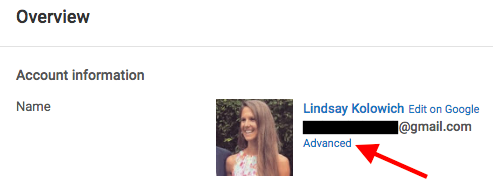
To claim your custom URL: Open up your YouTube account settings and click “Advanced” in your name section.

youtube-advanced-settings.png

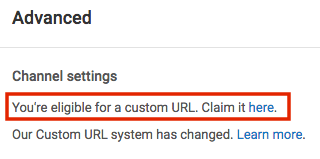
If you’re eligible for a custom URL, you’ll be prompted to claim yours by clicking a link.

youtube-eligible-for-custom-URL.png

Select the box next to “I agree to the Terms of Service.” Then, once you’re super sure it’s the URL you want since you can’t ever change it, click “Change URL” to make it final.


Transcripts on Youtube?

Posted September 16, 2016 By Frank Strona

Transcripts on Youtube?

Yup- on Hubspot.com’s recent tips

You can easily see the written transcripts of people’s videos.

Did you know that YouTube automatically generates a written transcript for every single video uploaded to its website? That’s right — and anyone has access to that transcript, unless the user manually hides it from viewers.

I can think of a number of different situations where video transcripts can come in handy. For example, maybe you want to write down a quote from a video, but the tedium of pausing-and-typing, pausing-and-typing would drive you up a wall. Or perhaps you need to find a specific section of a video, but don’t want to rewatch the whole thing to find it. With a transcript in hand, you can find information like this without doing it all by hand.

To see a video’s transcript: Open the video in YouTube and press the “More” tab underneath the video title. Choose “Transcript” from the dropdown menu.


Did you know that Youtube has hidden tools?

Posted September 14, 2016 By Frank Strona

yup.. thats what I found out after reading

17 Hidden YouTube Hacks, Tips & Features You’ll Want to Know About on hubspot.com

You can create a link that starts a YouTube video at a certain time.

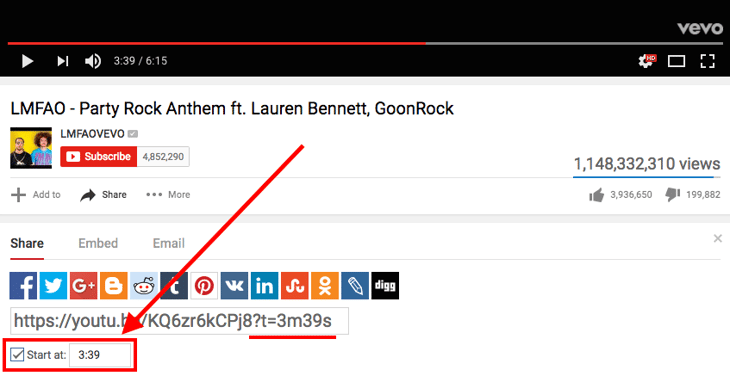
Ever wanted to send someone a YouTube video, but point them to a specific moment? Let’s say, for example, that you’re trying to recruit your friends to learn the dance in LMFAO’s “Party Rock Anthem” music video with you.

Instead of sending your friends the general YouTube link and instructing them to fast-forward to the 3:39 minute mark, you can actually send them a specific link that starts the video at whatever time you choose. Click here to see what I mean. I’ll wait.

Back? Alright, here’s how to do it.

To create a link that starts a YouTube video at a certain time: Open up the video and click “Share” underneath the video title. Then, under the first tab (also labeled “Share”), check the box next to “Start at:” and type in the time (in hours:minutes:seconds) you want. Alternatively, you can pause the video at the time you want it to start and that field will autofill.

After a few moments, you’ll see a tag add itself to the end of the generic YouTube link (in this case, ?t=3m39s). Simply copy that link and paste it wherever you’d like.

Alas, you can’t embed a video so it starts at a certain time; you can’t only link to it.


How to Run A Twitter Chat

Posted September 13, 2016 By Frank Strona

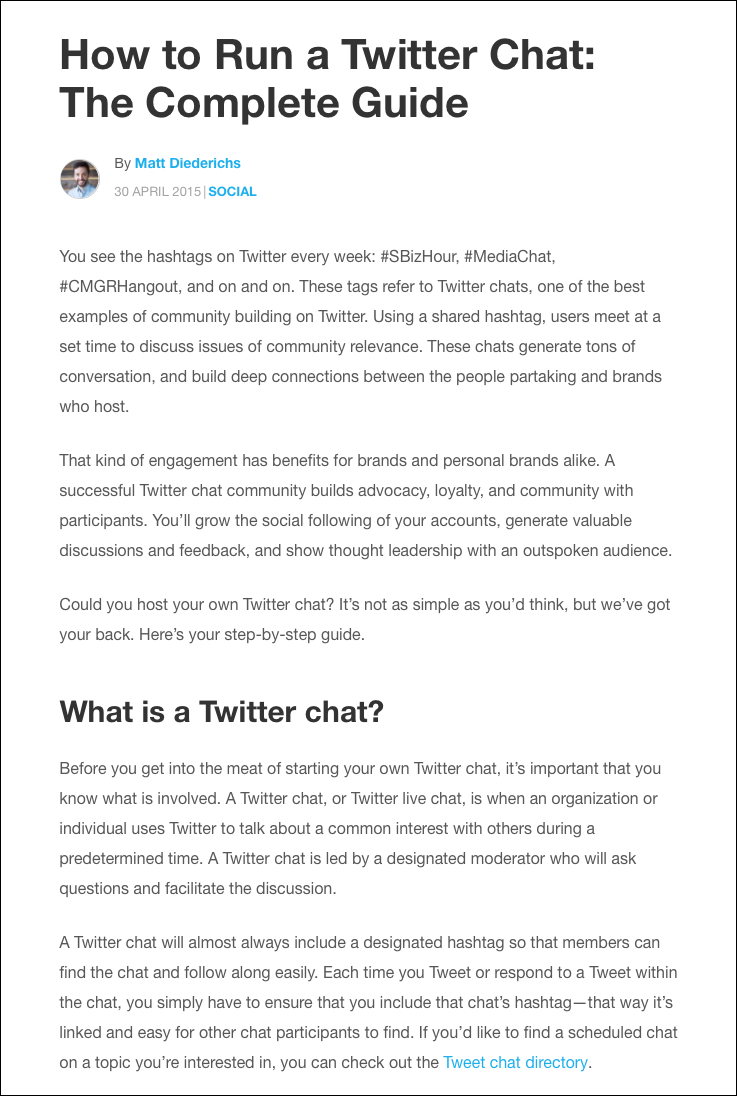
One of the more common questions I get is about “twitter chats” and how best to run them, how easy they are and what challenges and limits does hosting one include. Recently found a great posting on it, I thought worth sharing as well as some additional links.safariscreensnapz001

Hootsuite shared the following : How to Run a Twitter Chat: The Complete Guide which was a great stating place.

By Matt Diederichs  SOCIAL 

Here are a few additional places to read up on them. Also Twitters own

How to run a Twitter chat: 7 tips – TechRepublic


www.techrepublic.com/article/how-to-run-a-twitterchat-7-tips/

 TechRepublic Jul 7, 2014 – Before inviting the masses to fling their burning questions at you, here are 7 tips for gearing up for a successful Twitter chat.

The Ultimate Guide To Hosting A Tweet Chat – Forbes

www.forbes.com/sites/stevecooper/…/the-ultimate-guide-to-hosting-a-tweetcha

 Forbes Sep 30, 2013 – Tweet chats are a terrific way for businesses to engage with their … To make things runas smooth as possible, filter the conversation by …

How to run a Twitter chat — Knowhow Nonprofit

https://knowhownonprofit.org/how-to/how-to-run-a-twitterchat-1

 Mar 3, 2016 – Remember that not everyone is on Twitter (or wants to be), so be as inclusive as you can. Put your tweetchat into a transcript and use every …

The Ultimate Guide to Twitter Chats | Sprout Social

sproutsocial.com › Sprout Blog › Twitter

 Jul 12, 2016 – Using Twitter chats to boost engagement is a quick way to get your voice heard no matter if you’re building a personal brand or are a business.

[PDF]A STEP-BY-STEP GUIDE TO Twitter Chats FOR MINORITY SERVING …

https://www2.gse.upenn.edu/…/Twitter%20Chats%20Guide

 University of Pennsylvania

A Twitter Chat is an online conversation that brings together various Twitter users to engage in a …. When is the best time to host a Twitter Chat? When thinking …

How to Participate in a Tweet Chat | Janet Fouts

janetfouts.com › Blog › Twitter strategy › How to Participate in a Tweet Chat

 Twitter chats, sometimes known as a Twitter party or a tweet chat, happen when a group of … Easy guide to the Periscope video streaming app … Top tweetchat hosts are moving to Crowdchat because it’s the best tweetchat client it does …

How to Host a Twitter Chat: The Complete 10-Step Guide

www.contentfac.com/10-simple-steps-to-hosting-a-killer-twitterchat/

 Then you need to learn how to run a Twitter chat. This 10-step … THE 10-Step Guide to Hosting a Twitter Chat [+ Tool List] …. One of the best is Tweetchat.com.


  1. How to join a Twitter chat

    • 2 years ago
    • 9,876 views
    Twitter chats can be fun, informative and a great way to build your network. Here’s how you can participate in a Twitter chat.
  2. How to do a “Twitter Chat” or TweetChat

    • 3 years ago
    • 11,096 views
    Ever wanted to do a chat on twitter but don’t know how? Have you seen hashtags flying wildly across your twitter and wondered …
  3. What is a Twitter Chat – in a Nutshell #twitterchat in under 1 minute

    • 1 year ago
    • 478 views
    I explain what a Twitter Chat is in 1 minute (1 minute 10!) – I talk about #weddinghour which is a twitter chat I love to get involved in …
  4. How To Participate in Twitter Chats

    • 2 years ago
    • 2,101 views
    Pam Ross shares why and how to participate in a twitter chat. #Hashtags, Connections, Learning and more! Building Digital …

Even AskHow has a bunch

Aug 20, 2014  Twitter Chats 101: A complete look at how to join in or host your own Twitter chat.
https://blog.bufferapp.com/twitterchat-101
Most extensive list of Twitter Chats. Schedule includes chat hashtag, topic, description, moderators, day, and time of each Twitter chat. Add your TweetChat for …
tweetreports.com/twitterchat-schedule/
Twitter chats, sometimes known as a Twitter party or a tweet chat, happen when a group of people all tweet about the same topic using a specific tag (#) called.
janetfouts.com/how-to-participate-in-a-tweetchat/
Learn what a tweet chat is and how to start or join a tweet chat on Twitter.
weblogs.about.com/od/twitterfaqs/f/TwitterFAQTweetChat.htm
Sep 30, 2013  One of the great implements found within the social media toolbox is the ability to host or participate in a Twitter chat (or tweet chat). Making a …
www.forbes.com/sites/…/the-ultimate-guide-to-hosting-a-tweetchat/
Twubs is the best place to host and participate in Twitter Chats. Register your’s today or find others that interest you.
twubs.com/twitterchats/about
May 8, 2012  Hosting a Twitter chat is an amazing way to interact with your fans and followers, to better understand and grow your community quickly, as well …
www.socialmediaexaminer.com/twitterchat-guide/
Educational Chats on Twitter. Official Twitter Education Chat Shedule · How To Take Part in a Twitter Chat Or Moderate a Chat · My Twitter Chats page.
cybraryman.com/chats.html
CMWorld Twitter Chats …. No #CMWorld Chat; 12/22/15: Happy holidays! …. 9/9/ 14: No Chat Today – follow the #CMWorld hashtag all week while we are at …
www.contentmarketingworld.com/cmworld-twitterchats/
          

Now this one is kinda interesting and has some potential to make life really confusing or much more streamlined;

Twitter just turned DMs into a chat app

Sliding in your DMs could get way more stalker-y.

from Engadget

“Twitter has been implementing some important updates to protect its users lately, but its most recent change could help foster better conversations. The social network today tweeted (duh) a video showing off its latest additions to the Direct Messages feature that basically turns it into a chat app.

The new features include read receipts, live typing indicators and native URL previews to foster a better sense of real-time conversations. Twitter hasn’t said when the update will roll out, but it will most likely be hitting your DMs within the next few days.”

Full Story